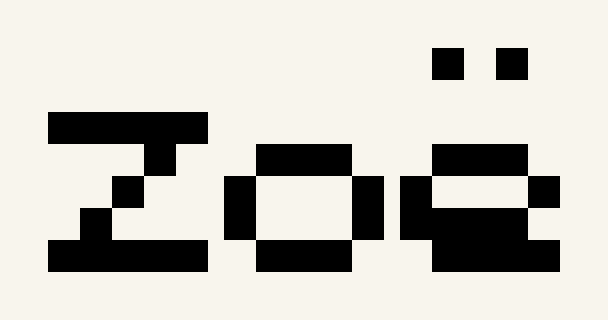
An accented name
Zoë in Compact Block. The diaeresis stays in the chart.
38 × 20 squares · 152 stitches · 1 colors
 OvO Pixel Cross Stitch Text Generator
Type a name, date or short message. Choose a stitch font, arrange the lines and see how large your finished design will be.
Names, dates and short messages. Keep each side within 300 stitches.
489 matching colors. Screen colors are approximate.
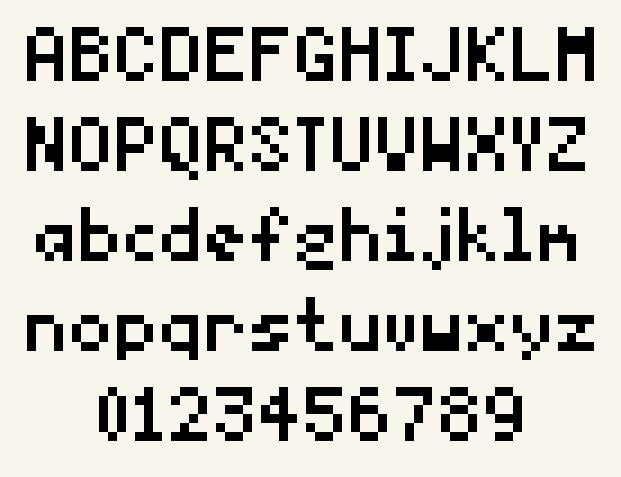
! " # $ % & ' ( ) * + , - . / 0 1 2 3 4 5 6 7 8 9 : ; < = > ? @ A B C D E F G H I J K L M N O P Q R S T U V W X Y Z [ \ ] ^ _ ` a b c d e f g h i j k l m n o p q r s t u v w x y z { | } ~ ¡ ¢ £ ¤ ¥ ¦ § ¨ © ª « ¬ ® ¯ ° ± ² ³ ´ µ ¶ · ¸ ¹ º » ¼ ½ ¾ ¿ À Á Â Ã Ä Å Æ Ç È É Ê Ë Ì Í Î Ï Ð Ñ Ò Ó Ô Õ Ö × Ø Ù Ú Û Ü Ý Þ ß à á â ã ä å æ ç è é ê ë ì í î ï ð ñ ò ó ô õ ö ÷ ø ù ú û ü ý þ ÿ Ā ā Ă ă Ą ą Ć ć Ĉ ĉ Ċ ċ Č č Ď ď Đ đ Ē ē Ĕ ĕ Ė ė Ę ę Ě ě Ĝ ĝ Ğ ğ Ġ ġ Ģ ģ Ĥ ĥ Ħ ħ Ĩ ĩ Ī ī Ĭ ĭ Į į İ ı IJ ij Ĵ ĵ Ķ ķ ĸ Ĺ ĺ Ļ ļ Ľ ľ Ŀ ŀ Ł ł Ń ń Ņ ņ Ň ň ʼn Ŋ ŋ Ō ō Ŏ ŏ Ő ő Œ œ Ŕ ŕ Ŗ ŗ Ř ř Ś ś Ŝ ŝ Ş ş Š š Ţ ţ Ť ť Ŧ ŧ Ũ ũ Ū ū Ŭ ŭ Ů ů Ű ű Ų ų Ŵ ŵ Ŷ ŷ Ÿ Ź ź Ż ż Ž ž ſ
Unsupported characters are shown beside your input. Your text is never silently shortened or transliterated.
Import an Ovopixel project JSON, up to 2 MB.
Count is fabric threads per inch. Aida usually uses over 1; 28-count over 2 has the same stitch size as 14-count over 1.
Fabric color is a preview. Blank squares stay unstitched. Extra fabric does not add stitches.
Free PDF, PNG and editable project. No sign-up needed. Full cross stitches only.
These previews and downloads come from the same full-stitch chart data used by the editor. They are simulated charts, not photographs of finished cross stitch.
Zoë in Compact Block. The diaeresis stays in the chart.
38 × 20 squares · 152 stitches · 1 colors
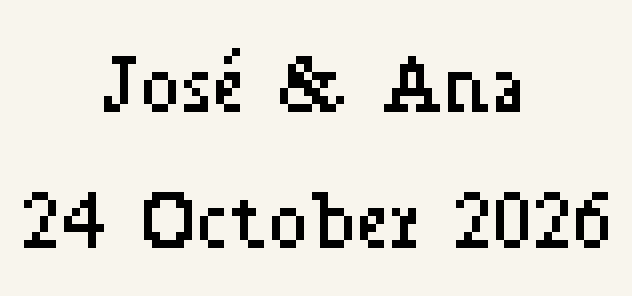
José & Ana with a centered date in Serif.
79 × 37 squares · 268 stitches · 1 colors
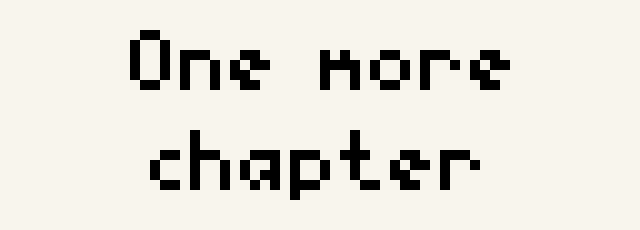
Classic lettering wraps at a fixed width of 64 stitches.
64 × 23 squares · 127 stitches · 1 colors
DMC screen color data adapted from MakeBead, CC BY 4.0. Fonts: Classic and Serif. Sample source credits.
Use this cross stitch font generator to arrange names, dates and short messages as full stitches. Choose a bitmap font, compare letter sizes and preview the entire phrase instead of assembling separate alphabet pictures.
Adjust spacing and line breaks, then check the size on your fabric. Open the same pattern in the editor to add details by hand. Manual edits are preserved when you regenerate text as a new copy.
Yes. Enter a name, choose the font and adjust spacing. Names and dates can use separate lines with centered alignment, and the preview shows the complete layout.
Compact Block, Classic and Serif are full-stitch bitmap fonts. Each font has a visible supported-character list. Latin letters, numbers, common punctuation and supported accents remain visible; unsupported characters produce a specific message.
Enable Wrap text to a fixed chart width and enter the width in stitches. Words move to the next line when needed. An oversized word is reported so you can reduce the letter scale, increase the width or add a line break.
No. Fabric count changes the physical size of the same stitch grid. Font scale changes the number of stitches used by the letters.
Yes. Open Edit pattern to paint or erase stitches. The original text settings stay with the project. If you later regenerate after manual edits, the tool creates a new text copy and keeps your edited version.
Yes. Download a color or black-and-white symbol PDF, PNG or editable project without signing up. PDF options include A4, Letter and larger detail squares.